

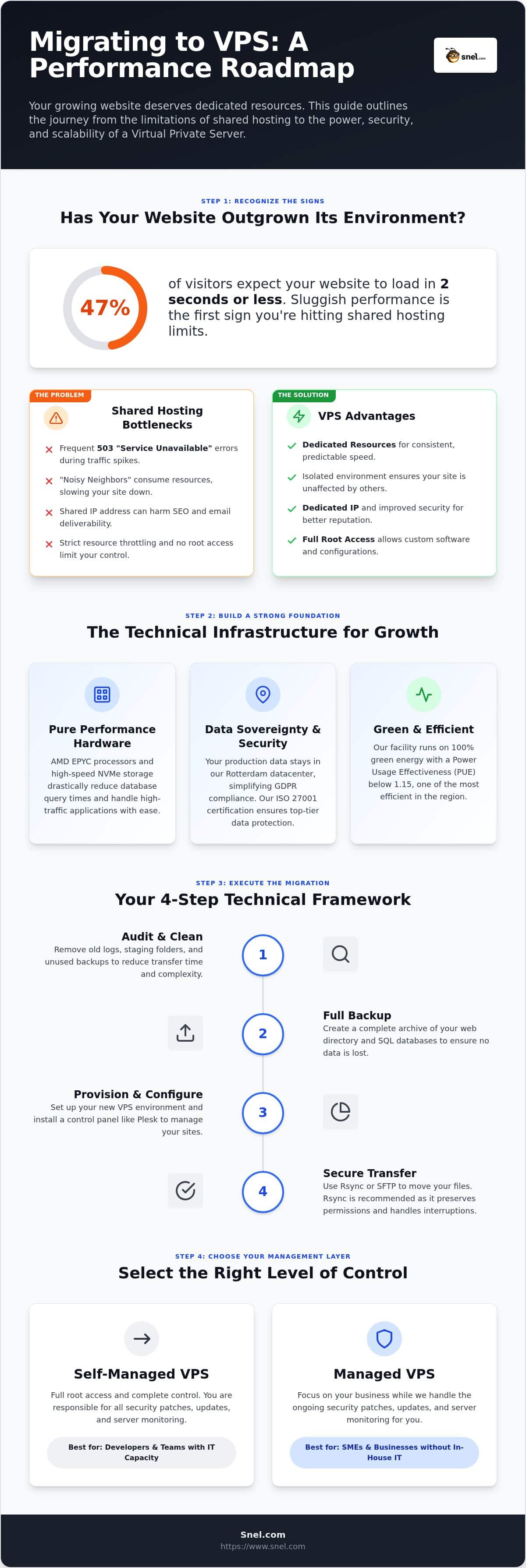
Did you know that 47% of your visitors expect your website to load in two seconds or less? If your growing site is currently stuck behind “resource limit reached” errors or sluggish load times during traffic spikes, you’ve likely outgrown your shared environment. It’s frustrating to watch your hard work slowed down by neighbors on a crowded server. We understand that the idea of migrating from shared hosting to VPS feels like a high-stakes operation, but staying put is no longer an option for a growing business.
You need the freedom to scale without worrying about security gaps or performance bottlenecks. This guide simplifies the transition. We’ll show you how to move your assets to a high-performance VPS in our Rotterdam datacenter without the headache of downtime or data loss. By the end of this article, you’ll have a clear roadmap to a faster, more isolated, and perfectly scalable hosting environment. It’s time to give your website the dedicated resources it deserves to thrive in 2026.
Key Takeaways
- Identify the specific performance bottlenecks, such as high Time to First Byte (TTFB) and recurring resource limit errors, that signal your website has outgrown its current environment.
- Understand how leveraging AMD EPYC processors and NVMe storage in our Rotterdam datacenter provides the compute power and disk speed necessary for high-traffic applications.
- Master a structured technical framework for migrating from shared hosting to VPS that prioritizes full data backups and seamless control panel setup to prevent downtime.
- Determine whether a self-managed configuration or a Managed VPS best fits your team’s technical capacity for handling ongoing security patches and server monitoring.
Recognizing the Signs: When to Outgrow Shared Environments
Shared hosting is a reliable starting point for new projects. But as your traffic grows, you’ll notice the cracks. Are you seeing 503 “Service Unavailable” errors during your busiest hours? This usually means your server has hit its concurrent connection limit. If you find yourself frequently hitting these walls, migrating from shared hosting to VPS is the logical next step. Look for these specific warning signs:
- Frequent 503 errors during traffic surges.
- A Time to First Byte (TTFB) exceeding 1000ms.
- Slow backend performance when saving posts or processing orders.
Then there’s the “noisy neighbor” effect. On a shared server, you share resources with hundreds of other sites. If one site experiences a sudden surge, your performance drops. Transitioning to a private environment gives you dedicated resources that others can’t touch.
The Limits of Shared Resource Allocation
Shared plans use strict CPU and RAM throttling. When your site exceeds these invisible limits, the host simply slows you down. This is particularly problematic for modern, resource-heavy web applications or SaaS platforms that require consistent compute power. With VPS Hosting, you get modular scaling of vCPU and RAM to match your exact needs, ensuring your site stays fast even as your database grows.
Security and Compliance Drivers
Security is often the final push. Shared environments use shared IP addresses. If a neighbor sends spam, your email deliverability and SEO rankings suffer. GDPR compliance is also easier when your data is isolated. Our Rotterdam datacenter ensures your production data stays in the Netherlands, meeting strict EU residency requirements. You also gain root access. This allows you to install custom security configurations or specific software versions like PHP 8.6.0 Beta 1 that shared hosts don’t support.
Preparing Your Infrastructure: The Technical Foundations of VPS
A successful transition starts with the right hardware. When migrating from shared hosting to VPS, you aren’t just buying space; you’re buying performance. Selecting AMD EPYC processors ensures high compute throughput for complex scripts and high-traffic applications. You should also opt for NVMe storage. NVMe drastically reduces database query times compared to traditional SSDs, which is vital for e-commerce platforms processing hundreds of transactions per hour.
Data sovereignty is a non-negotiable factor in 2026. Many large providers are subject to the US Cloud Act, which creates jurisdictional complexities for European businesses. By choosing our Rotterdam datacenter, you ensure your production data stays within the Netherlands. This simplifies GDPR compliance and provides the legal certainty your clients expect. Our ISO 27001 certification further guarantees that your infrastructure meets rigorous international security standards for data protection.
Pure Performance VPS vs. Standard Virtualization
Standard virtualization often relies on shared virtual cores, which can lead to inconsistent performance. Our Pure Performance VPS provides dedicated vCPU allocation. This means the power you pay for is always available to your application. We also offer modular scaling. You can increase RAM or storage independently as your site grows, avoiding the need for expensive, bulk upgrades. If you have questions about specific configurations, feel free to reach out to our team for personal advice.
Green Energy and Operational Efficiency
Efficiency isn’t just about speed; it’s about sustainability. Our Rotterdam facility operates with a PUE (Power Usage Effectiveness) below 1.15. This makes it one of the most efficient datacenters in the region. We power everything with 100% green energy. For businesses with sustainability goals, this operational efficiency provides a clear advantage without sacrificing the raw power needed for modern, resource-heavy web applications.
Executing the Migration: A Step-by-Step Technical Framework
Moving your data requires more than a simple copy-paste. When migrating from shared hosting to VPS, start with a comprehensive audit. Remove old log files, staging folders, and unused backups to reduce transfer time. Once clean, follow this framework:
- Full Backup: Create a complete archive of your web directory and SQL databases.
- Provisioning: Set up your new environment in our Rotterdam datacenter and install a control panel like Plesk on your new VPS Hosting environment.
- Secure Transfer: Use Rsync or SFTP to move files. Rsync preserves file permissions and handles interruptions better than standard FTP.
- Testing: Modify your local hosts file to map your domain to the new VPS IP. This lets you browse the site on the new server before the public does.
This efficiency is crucial when migrating from shared hosting to VPS for large-scale e-commerce sites. Testing catches configuration errors or missing PHP modules without impacting your live traffic. It’s the most reliable way to ensure a zero-downtime transition.
Database and File Transfer Best Practices
Large SQL databases often fail during web-based imports due to PHP timeout limits. Use the command line (CLI) to export and import your data. This method is faster and bypasses the limitations of tools like phpMyAdmin. After the transfer, verify that file ownership is correctly assigned to the web user to prevent 403 Forbidden errors on your Linux VPS.
DNS Transition and TTL Management
Propagation delays can cause confusing downtime. Lower your DNS Time to Live (TTL) to 300 seconds at least 24 hours before your planned move. This ensures that when you update your A records, the change reaches visitors almost instantly. Finally, verify your SSL certificate installation on the new IP to maintain secure HTTPS connections throughout the switch.
Choosing Your Management Layer: Self-Managed vs. Managed VPS
Deciding how to manage your new environment is the final piece of the puzzle. Migrating from shared hosting to VPS requires a management strategy that supports your business growth and technical capacity. If you are a developer requiring full root access and custom OS builds, the self-managed route offers total autonomy. However, for many businesses, the technical burden of maintaining a server is a distraction from core goals. Choosing a Managed VPS means our in-house experts handle security patches, OS updates, and 24/7 monitoring.
Consider the cost-benefit of 24/7 expert support versus hiring a full-time in-house system administrator. A dedicated team ensures your infrastructure remains resilient without the overhead of a salary. We also integrate Acronis Cyber Protect to provide an extra layer of security for your migrated data. This solution combines reliable backups with AI-based anti-malware. It provides a safety net that shared environments simply cannot match.
The Benefits of Managed Infrastructure
Our 24/7 monitoring detects issues before they impact your users. When migrating from shared hosting to VPS, the shift from a shared plan to an active management layer prevents the performance degradation that often plagues unmonitored servers. Our team acts as your dedicated partner, ensuring that your environment remains optimized for speed and reliability. This proactive maintenance reduces operational stress and keeps your focus on building your brand.
Scaling for the Future
Modular upgrades allow you to scale vCPU and RAM as traffic increases. But what happens when your application outgrows a virtual environment? Knowing when to move to a fully managed dedicated server is a key part of your growth strategy. This path ensures you always have the raw hardware throughput required for enterprise-level operations. You only pay for the resources you actually use while maintaining a clear path for expansion.
Empower Your Website with Scalable Infrastructure
Upgrading to a VPS is more than just a performance boost; it’s a strategic commitment to your site’s security and long-term scalability. By moving away from the crowded environments of shared hosting, you gain the dedicated compute power of AMD EPYC processors and the rapid response times of NVMe storage. Whether you choose to manage the server yourself or partner with our team for a managed solution, your production data stays protected within our ISO 27001 certified Rotterdam datacenter. This transition provides the stable foundation your business needs to handle traffic surges with ease.
Migrating from shared hosting to VPS ensures your growing business isn’t held back by restrictive resource caps. We support your journey with a 100% uptime SLA and 24/7 in-house expert support. Our monthly cancellable plans offer the flexibility to adapt your resources as your needs evolve.
We’re ready to help you take this next step. Let’s build a faster, more reliable home for your website together.
Frequently Asked Questions
Will my website go offline during the migration from shared hosting to VPS?
No, you can achieve zero downtime by using a staging approach. First, copy your files and database while the old site remains live. Test the new environment in our Rotterdam datacenter thoroughly using your local hosts file. Once verified, update your DNS records. This method is the safest way of migrating from shared hosting to VPS without interrupting your visitors’ experience or losing potential customers.
Do I need technical skills to manage a VPS after migrating?
It depends on whether you choose a self-managed or Managed VPS. If you’re comfortable with command-line interfaces and server configuration, a self-managed option offers full control. However, if you prefer to focus on your business, our managed services provide 24/7 in-house expert support. Our team handles security patches, updates, and monitoring, making the transition accessible even if you don’t have deep technical infrastructure knowledge.
Is a VPS more secure than shared hosting for processing payments?
Yes, a VPS provides superior security through resource isolation and a dedicated IP address. Unlike shared hosting, where a vulnerability in a neighbor’s site could potentially expose the entire server, a VPS environment is private. This isolation is a key driver for meeting PCI DSS 4.0 requirements. Combined with our ISO 27001 certification and Dutch data residency, your payment processing environment becomes significantly more resilient against external threats.
How long does the migration process typically take for a standard WordPress site?
A standard WordPress migration usually takes between two to four hours of active technical work. This includes auditing your files, transferring data via secure protocols, and configuring the database on your new VPS. However, you should account for an additional 24 to 48 hours for full DNS propagation. Lowering your TTL values before migrating from shared hosting to VPS can help speed up this final stage significantly.
Can I keep my current domain name when I move to a new VPS provider?
You can absolutely keep your current domain name. You have two choices: either point your existing domain’s A records to your new VPS IP address or transfer the domain registration to us for easier management. Keeping your domain is standard practice during any hosting move. If you decide to transfer the registration, we can help ensure the DNS settings are correctly configured for your new high-performance environment in Rotterdam.