
Most users blame their internet connection for RDP lag, but the real bottleneck is usually the physical distance and the quality of the underlying server hardware. You’ve likely felt that frustrating half-second delay between clicking a mouse and seeing the cursor move on your screen. It’s an exhausting way to work, especially when you’re managing critical tasks or providing support to clients from a remote location. Choosing the right Windows VPS for Remote Desktop shouldn’t feel like a gamble with your daily productivity. We believe you deserve a reliable partner who treats your infrastructure with the same care you do.
This guide will show you how to eliminate those frustrating delays by leveraging high-performance Dutch infrastructure and transparent licensing models. You’ll discover how to select a setup that offers seamless, low-latency access while maintaining strict GDPR compliance through our Rotterdam-based datacenter. We’ll explore the specific hardware requirements for 2026, the benefits of AMD EPYC processors, and how our neighborly expert support keeps your remote office running smoothly without hidden costs.
Key Takeaways
- Learn why dedicated vCPU allocation on AMD EPYC processors is essential for maintaining a stutter-free Windows Server environment.
- Discover how to optimize your Windows VPS for Remote Desktop to achieve the lowest possible latency and a seamless user experience.
- Protect your data sovereignty by hosting in a Rotterdam-based, ISO 27001 certified datacenter that ensures full GDPR compliance.
- Determine if a managed or unmanaged setup provides the right balance of expert assistance and independent scaling for your specific workload.
Understanding Windows VPS for Remote Desktop Access
A Windows VPS for Remote Desktop is a virtualized server environment running Windows Server that’s specifically tuned for graphical interactions. Unlike a standard server meant for background tasks, these environments prioritize the Remote Desktop Protocol (RDP) to transmit a smooth user interface from the datacenter to your local screen. It’s like having a high-powered workstation that follows you anywhere, accessible from a laptop, tablet, or even a thin client.
Common use cases include:
- Secure remote work: Keeping sensitive business data within a controlled environment rather than on individual employee devices.
- Legacy applications: Hosting older Windows software that your modern local machines can’t run.
- Centralized management: Providing a single point of truth for file storage and application access for distributed teams.
Windows Server Editions for Remote Work
Choosing the right operating system is the first step toward a stable environment. Windows Server 2022 and 2025 are the preferred choices because they handle RDP compression more efficiently than older versions. If you plan on hosting multiple users, you’ll need to account for Microsoft Remote Desktop Services (RDS) licensing. We provide the Windows Server VPS infrastructure you need while helping you understand these licensing paths to avoid unexpected compliance costs.
Why Latency is the Deciding Factor
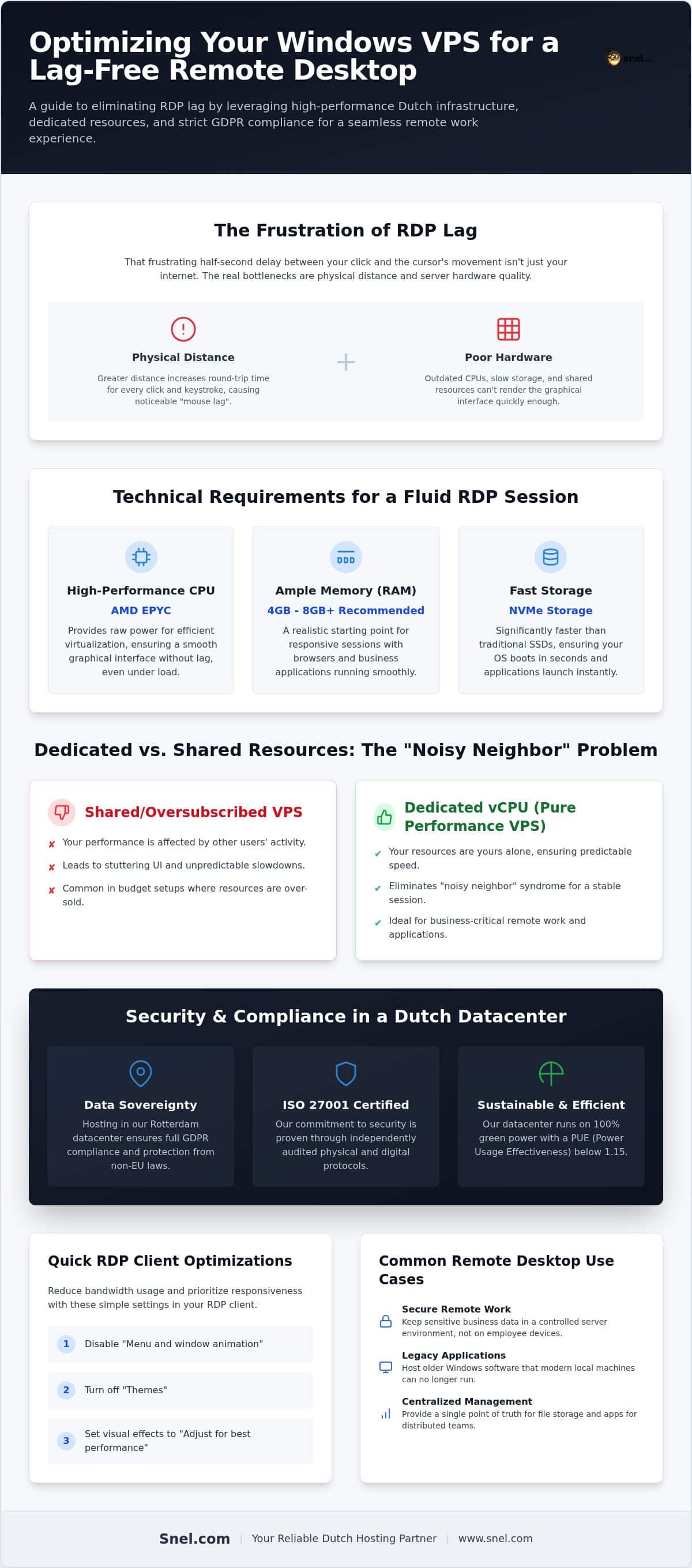
Productivity stops when you feel “mouse lag.” This delay happens when the physical distance between you and the datacenter is too great. By utilizing our Dutch-based infrastructure in Rotterdam, you minimize the round-trip time for every click and keystroke. We back our Pure Performance VPS with AMD EPYC processors and high-bandwidth uplinks ranging from 1 to 100 Gbps. This ensures your Windows VPS for Remote Desktop maintains a high frame rate and snappy response times, even during peak work hours.
Technical Requirements for a Lag-Free RDP Experience
CPU performance dictates how quickly the server renders the graphical interface. When you’re using a Windows VPS for Remote Desktop, the server does the heavy lifting of drawing windows and processing user inputs. Modern AMD EPYC processors handle these virtualization tasks with much higher efficiency than older architectures. They provide the raw power needed for a truly fluid experience without the lag common in budget setups.
Memory and storage are equally vital for stability. Windows Server 2022 requires at least 2 GB of RAM just to operate. For a responsive session with applications like browsers or accounting software, 4 GB to 8 GB is a more realistic starting point. We utilize NVMe storage because it’s significantly faster than traditional SSDs. This ensures your OS boots in seconds and applications launch without that annoying delay.
Dedicated vs. Shared Resources
Many providers oversubscribe their hosts. This leads to “noisy neighbor” syndrome where another user’s resource spikes slow down your session. Our dedicated Pure Performance VPS infrastructure, running on our owned hardware in Rotterdam, avoids this by ensuring your resources are yours alone. Dedicated vCPU allocation means your UI won’t stutter just because another server on the same host is under heavy load. It’s about predictable speed.
Graphics and UI Optimization
Optimizing your Windows VPS for Remote Desktop involves more than just hardware. In the RDP client, disabling “Menu and window animation” and “Themes” reduces bandwidth usage without losing clarity. Setting the server’s visual effects to “Adjust for best performance” helps the system focus on responsiveness rather than transparency. If you’re unsure which tier fits your specific workload, you can chat with our team to find the perfect match for your needs.
Security and Compliance in a Dutch Datacenter
Choosing a Windows VPS for Remote Desktop involves more than comparing hardware specs; it’s about choosing a legal home for your data. Hosting your production environment in our Rotterdam datacenter ensures your business benefits from strict Dutch and EU privacy laws. This data sovereignty protects you from the jurisdictional reach of non-EU regulations. It’s a reliable way to maintain GDPR compliance while keeping your most sensitive files on hardware we own and manage directly.
Our commitment to security is backed by our ISO 27001 certification. We don’t just talk about reliability; we prove it through audited physical and digital security protocols. We also believe that high performance shouldn’t come at the cost of the environment. Our datacenter runs on 100% green power and maintains a Power Usage Effectiveness (PUE) below 1.15. This efficiency ensures your remote work environment is both powerful and sustainable.
Protecting the RDP Entry Point
Security starts with smart configuration. Leaving the default RDP port 3389 open to the world is a common mistake that invites automated attacks. We encourage users to implement a Private Network to create a secure, isolated path for your data. By moving your RDP traffic away from the public internet, you significantly reduce your attack surface and keep your login credentials safe from brute-force attempts.
Automated Backups and Disaster Recovery
A true hosting partner prepares for every scenario. We provide Acronis Cyber Protect to handle AES-256 encrypted backups of your Windows VPS for Remote Desktop. While your daily operations run in Rotterdam, we store disaster recovery backups in Frankfurt for maximum safety. Our team provides 24/7 monitoring to ensure the underlying infrastructure remains stable, catching potential issues before they impact your workday.
Selecting and Managing your Windows VPS
Deciding between a managed or unmanaged setup depends entirely on your team’s technical capacity. An unmanaged Windows VPS for Remote Desktop gives you total administrative control to install custom software and tweak every registry setting. If you’d rather focus on your core business, a Managed VPS allows our experts to handle the OS updates and security patches for you. We don’t believe in vendor lock-in. Our monthly cancellable plans provide the agility to pivot without being tied to long-term contracts.
Scaling is just as straightforward. As your user count grows, you can independently increase your vCPU, RAM, or storage through our portal. This ensures your remote environment stays snappy as your workload expands. You only pay for what you need, when you need it. This flexibility is vital for growing SMEs and developers who need to adjust resources without downtime.
The Snel.com Setup Process
Getting started is simple and efficient. First, select your Windows VPS for Remote Desktop configuration based on how many users will be active simultaneously. We then deploy the OS with initial security hardening already in place. Finally, you connect using the standard Remote Desktop Connection (MSTSC) client. It’s built-in on Windows and available as an app for all major platforms, making it accessible for your entire team.
Expert Support When It Matters
We reject the impersonal model of hosting giants. When you have a question, you talk to our in-house team in Rotterdam, not an outsourced support tier reading from a script. We’re enthusiasts who care about your success. Our experts answer directly, providing clear solutions that keep your remote operations running without the wait. It’s a partnership built on reliability, transparency, and direct communication.
Building Your Future-Proof Remote Workspace
A high-performance remote environment is no longer a luxury for distributed teams; it’s a fundamental requirement for 2026 and beyond. By prioritizing dedicated resources like AMD EPYC processors and NVMe storage, you eliminate the latency that stalls productivity. Your choice of a Windows VPS for Remote Desktop should also reflect your commitment to data privacy and sustainability. Hosting in our ISO 27001 certified Rotterdam datacenter ensures your operations remain GDPR compliant while running on 100% green energy.
Choosing the right infrastructure means moving away from impersonal giants toward a partner that offers 24/7 in-house expert support. Whether you need to scale your vCPU count or secure a private network, our team is here to guide you through every technical hurdle. We’re dedicated to providing the stability and transparency your business needs to thrive in a remote-first world.
We’re ready to help you build a lag-free workspace that grows alongside your team’s ambitions.
Frequently Asked Questions
What is the difference between a Windows VPS and a regular desktop?
A Windows VPS for Remote Desktop runs on server-grade hardware in a datacenter, offering 24/7 availability and high-speed network uplinks. Unlike a local desktop, it isn’t limited by your local power or internet stability. It uses Windows Server, which is optimized for multi-user environments and background tasks. This makes it more reliable for hosting applications that need to stay online even when your local machine is turned off.
How many users can connect to a Windows VPS via RDP simultaneously?
By default, Windows Server allows two concurrent administrative sessions. If you need more users to work on the server at the same time, you’ll need to install the Remote Desktop Session Host role and acquire Remote Desktop Services (RDS) Client Access Licenses (CALs). The total number of users your server can support depends on your vCPU and RAM allocation, as each graphical session consumes a specific amount of system resources.
Do I need a separate license for Windows Server on my VPS?
No, the core Windows Server license is typically included in your monthly plan when you select a Windows VPS for Remote Desktop. We handle the SPLA (Services Provider License Agreement) reporting for the operating system itself. However, you’re responsible for licensing the specific applications you run on the server, such as Microsoft Office or specialized database software, unless those are specifically provided as part of a managed service.
Can I run trading software or automated bots on a Windows VPS?
Yes, our Pure Performance infrastructure is an excellent environment for trading platforms and automated bots that require 100% uptime. Since our Rotterdam datacenter features high-bandwidth connectivity and AMD EPYC processors, your software can execute commands with minimal latency. The persistent nature of a VPS means your bots continue running even after you disconnect your RDP session, ensuring you never miss a market movement or a critical task. For active traders, having tools like an SPX to SPY Converter accessible on your remote desktop can help you quickly translate option strikes and manage your portfolio with precision.
When you cancel your plan, your data is permanently deleted from our production servers in Rotterdam once the service period ends. We follow strict data handling protocols to ensure your privacy is protected. We recommend using our Acronis backup integration to download a local copy of your files before the cancellation date. Because our plans are monthly cancellable, you have full control over your data lifecycle without long-term commitments.