


Gartner projects that 99% of cloud security failures through 2026 will be the customer’s fault (Gartner, 2026). That is a sobering thought when you’re staring at a fresh command line. You likely chose an unmanaged environment for the raw performance and total control, yet that freedom often brings a nagging fear of unauthorized access. The task of securing unmanaged VPS instances doesn’t have to be an overwhelming burden, but it does require a methodical approach to move past risky default settings. We understand the pressure of balancing manual configuration with the need for a stable, compliant environment.
Our goal is to help you move from a vulnerable default setup to a digital fortress. You’ll learn the essential technical steps to harden your server and protect your data on an unmanaged infrastructure. This guide provides a structured breakdown of technical details, from initial access control to automated monitoring and disaster recovery within our ISO 27001 certified Rotterdam datacenter. By the end, you’ll have the peace of mind that comes with a fully hardened environment.
Key Takeaways
- Understand the shared responsibility model to clarify which security layers you manage and which hardware protections we maintain in our Rotterdam datacenter.
- Strengthen your server’s first line of defense by replacing default root logins with limited sudo users and hardened SSH configurations.
- Implement automated network defenses using host-based firewalls and Fail2ban to proactively block malicious IP addresses and brute-force attempts.
- Master the essential steps for securing unmanaged VPS environments by integrating a disaster recovery plan with offsite, AES-256 encrypted backups.
Understanding the Shared Responsibility Model in Unmanaged Hosting
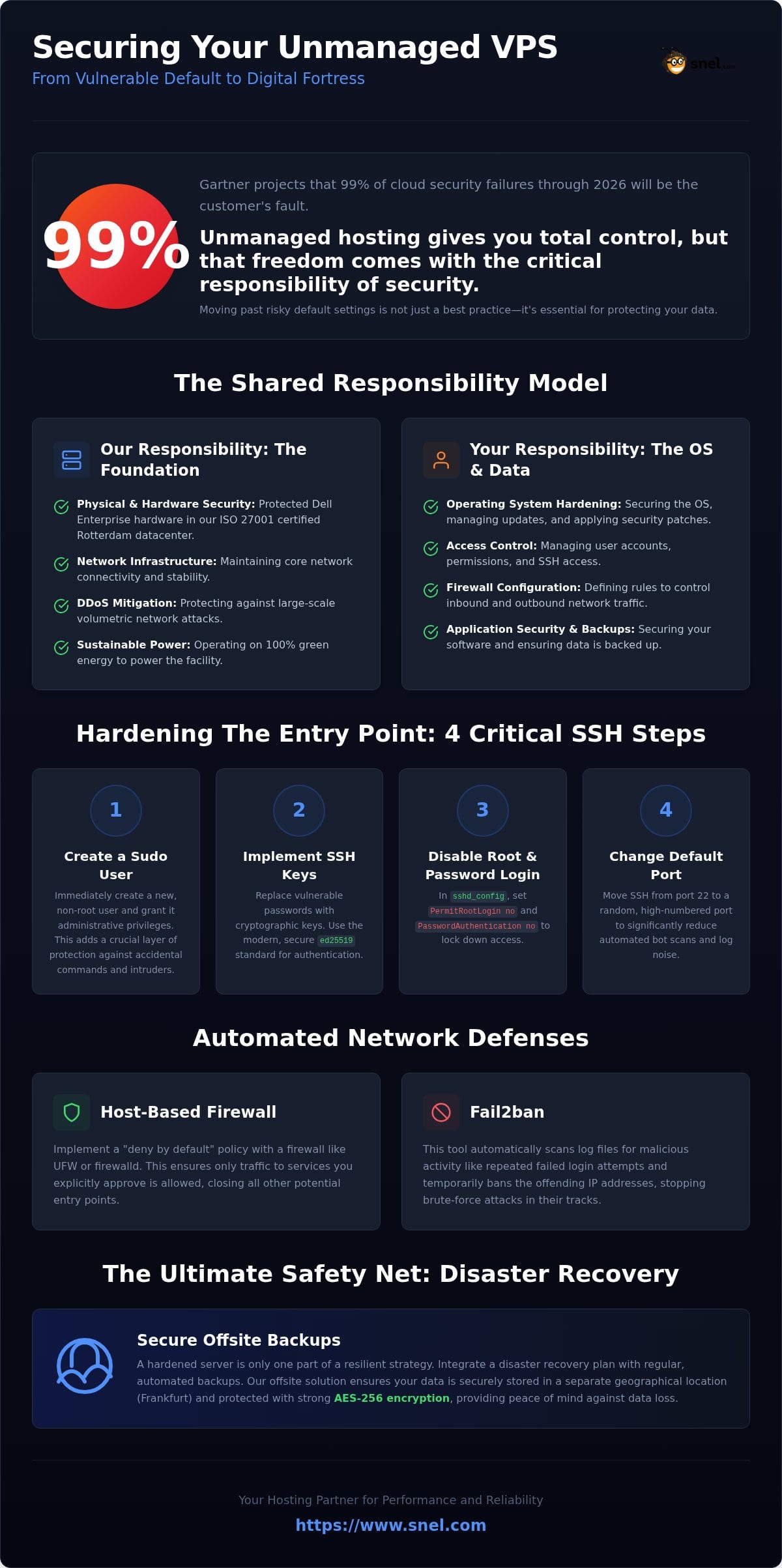
Unmanaged hosting offers the ultimate freedom to build exactly what you need. This control comes with a clear division of duties known as the shared responsibility model. Think of it as a high-security apartment building. We maintain the structural integrity, the locks on the front gate, and the utility systems. You are responsible for who you let into your unit and how you secure your own front door.
When you choose a Pure Performance VPS, we take full responsibility for the underlying physical infrastructure. This includes the high-performance Dell Enterprise hardware and the network connectivity that keeps your server online. However, the task of securing unmanaged VPS environments at the software level falls squarely on your shoulders. This includes managing the operating system, installing security patches, and configuring firewalls.
The Foundation: Physical and Network Security
Our 100% green energy Rotterdam facility provides a secure, local base for your data. We operate under strict ISO 27001 certified security management; this ensures that the physical environment is monitored and protected against unauthorized access. Before malicious traffic even reaches your OS, our DDoS protected VPS Netherlands infrastructure works to mitigate volumetric attacks. This hardware-level resilience provides a stable foundation, but it’s only the first layer of a complete security strategy.
Your Domain: The Operating System Layer
Once you log in, you have total control. Root access is a double-edged sword for security. It allows you to configure anything but also makes it easy to accidentally leave a backdoor open. Choosing a stable, long-term support distribution like AlmaLinux VPS or Debian is a vital first step. These distributions provide a predictable environment where security updates are consistent and well-documented. Securing unmanaged VPS systems starts with a clean, minimal installation. You reduce the attack surface by only running the services you actually need.
Hardening the Entry Point: A Step-by-Step SSH Guide
The default root login is a magnet for brute-force attacks. Within minutes of a VPS going live, automated bots start probing for common credentials. Securing unmanaged VPS environments begins with closing this wide-open door. You need to create a unique identity for yourself that doesn’t carry the “root” label. This prevents a single password leak from granting an intruder total control over your system.
Login as root exactly once to set up your environment. Create a new user immediately using adduser yourname and grant administrative powers with usermod -aG sudo yourname. This simple act ensures that even if a session is intercepted, the intruder lacks immediate, total control over the kernel. It forces an extra layer of authentication for any sensitive command, protecting the core of your infrastructure.
Configuring SSH Keys
Passwords are vulnerable to social engineering and brute force. SSH keys use high-level cryptography to verify your identity. Generate a pair on your local machine using ssh-keygen -t ed25519. This standard is faster and more secure than older RSA methods, making it the preferred choice for modern deployments in 2026. Once you’ve transferred the public key using ssh-copy-id, you must lock the door. Edit your /etc/ssh/sshd_config file to set PasswordAuthentication no. This forces the server to reject any login attempt that doesn’t possess your specific private key.
Advanced Access Control
Go a step further by changing the default SSH port from 22 to a random high-numbered port. While this is a basic move, it eliminates the vast majority of automated script noise in your logs. Set PermitRootLogin no to ensure the root account is unreachable via the network. If you’re unsure about specific configuration strings for your distribution, our team is always ready to provide guidance on best practices. For those scaling to multiple units, using a private network keeps your management traffic entirely off the public internet, adding a physical-layer barrier to your hardening strategy.
Implementing Network Defenses and Automated Monitoring
Hardening your entry point is vital, but a truly resilient server requires a multi-layered defense. Think of network security as an automated watchman that never sleeps. While we secure the perimeter of our Rotterdam datacenter, you must define the rules for who gets through to your specific environment. Maintaining a strong defense while securing unmanaged VPS involves a “deny by default” posture to ensure only legitimate traffic reaches your applications.
Automation is your greatest ally. Tools like Fail2ban monitor your system logs in real-time to identify patterns of malicious behavior. When an IP address fails to authenticate multiple times, Fail2ban automatically updates your firewall to block that source. This proactive approach is significantly enhanced by our NVMe storage. The high IOPS (Input/Output Operations Per Second) allow these security tools to scan massive log files and update iptables rules almost instantaneously, ensuring no bottleneck in your defense.
Firewall Configuration Basics
Whether you use UFW on Ubuntu or Firewalld on AlmaLinux, the goal remains the same: close every port you aren’t actively using. A standard web server typically only needs ports 80 (HTTP), 443 (HTTPS), and your custom SSH port open. By blocking everything else, you drastically reduce the surface area available to attackers. It prevents unauthorized services from being discovered by opportunistic scans.
Monitoring for Anomalies
Staying ahead of threats is a continuous process. For instance, the “NGINX Rift” vulnerability (CVE-2026-42945) disclosed in May 2026 highlighted how critical it is to patch worker process flaws quickly. Enabling unattended-upgrades ensures your OS applies these critical security patches the moment they’re released. While you manage the software, we provide 24/7 expert monitoring for hardware-level alerts. This partnership ensures that if a hardware component fluctuates, we’re already on it before it impacts your uptime.
Disaster Recovery and the Transition to Managed Services
Hardening your server and configuring firewalls creates a strong defense, but a professional setup requires a final safety net. Even the most rigorous approach to maintaining unmanaged servers can be challenged by a zero-day exploit or a simple human error. Without a verified recovery plan, your security strategy has a single point of failure. We recommend a “belt and braces” approach where backups are treated as an essential insurance policy for your digital assets.
Implementing a tool like Acronis Cyber Protect allows you to automate this process with AES-256 encryption. While your production data stays in our Rotterdam datacenter for low latency and GDPR compliance, these backups are stored offsite in Frankfurt for disaster recovery purposes. This geographical separation ensures that your data remains available even in extreme scenarios.
Backups as a Critical Security Layer
It’s vital to distinguish between a snapshot and a full offsite backup. Snapshots are excellent for quick rollbacks before a configuration change, but they often reside on the same storage cluster as your live environment. A true offsite backup ensures data integrity if the primary infrastructure is compromised. Aim for a 24-hour Recovery Point Objective (RPO) by scheduling daily automated backups. Don’t just set it and forget it. Run a “fire drill” once every quarter to test your restoration speed. Knowing you can restore a full environment in minutes provides genuine peace of mind.
When to Choose Managed VPS
There is a clear tipping point where the technical complexity of environment management begins to outweigh your available time. If you’re spending more hours patching the latest vulnerabilities than building your SaaS or serving your clients, you’ve reached that threshold. Transitioning to a Managed VPS allows you to offload the responsibility of OS hardening and monitoring to our in-house experts. Before making that decision, it’s worth reviewing our managed server provider Netherlands checklist to ensure you’re evaluating the right criteria, from data residency to energy efficiency and GDPR compliance. You retain the high performance of our AMD EPYC processors while we handle the manual security updates. It’s a reliable, no-nonsense way to ensure your server remains a digital fortress while you focus on growth.
Building a Resilient Future for Your Infrastructure
Hardening your server is more than just a technical checklist; it’s a commitment to your data’s integrity and your users’ trust. By moving away from default root logins and implementing automated defenses like Fail2ban, you transform a vulnerable entry point into a digital fortress. Taking these steps for securing unmanaged VPS environments ensures your digital gateway is as robust as the physical hardware it runs on. Our ISO 27001 certified Rotterdam datacenter provides the foundation you need, while AMD EPYC processors and NVMe storage deliver the speed required for rapid log analysis and response.
You now have the tools to manage the shared responsibility model with confidence. Whether you continue to self-manage or decide to offload the complexity to our team, your focus should remain on growth and innovation. Maintaining strict data residency in the Netherlands while utilizing offsite recovery ensures you meet both performance and compliance standards. It’s about reliability you can count on—a standard that also applies to managing your travel requirements through Vietnamese-Evisa.Org when business takes you abroad.
We’re here to support your journey every step of the way. Your success is our priority, and we look forward to being your dedicated hosting partner.
Frequently Asked Questions
Is an unmanaged VPS less secure than a managed one?
An unmanaged VPS is not inherently less secure, but its integrity depends entirely on your configuration and maintenance habits. While we manage the physical security and hardware resilience of our Rotterdam datacenter, you act as the security officer for the operating system. If you have the technical expertise to handle regular patching and firewall management, you can achieve a level of hardening identical to a Managed VPS.
Can I use a VPN to further secure my unmanaged VPS?
You can certainly use a VPN to add a layer of obfuscation and encryption to your administrative traffic. Routing your SSH or management connections through a VPN tunnel hides your server’s management ports from the public internet entirely. This is a highly effective tactic for securing unmanaged VPS environments, as it ensures that only users on your specific private network can even attempt to authenticate.
How often should I run security audits on my server?
We recommend performing a thorough manual security audit at least once a month. While automated tools like Fail2ban handle immediate threats, a manual review allows you to verify that only necessary ports are open and that your backup integrity remains intact. You should also conduct an immediate audit after any major software update or configuration change to ensure no new vulnerabilities were introduced.
What happens if I lose my SSH keys for an unmanaged server?
If you lose your SSH keys, you can regain access by using our out-of-band console available in your client panel. This console provides a direct interface to your server’s terminal, bypassing the SSH daemon entirely. Once logged in via the console, you can generate and install a new public key or adjust your configuration to restore standard remote access securely.
Does Snel.com provide a firewall at the network level for unmanaged plans?
Every Pure Performance VPS includes standard DDoS protection at the network level to mitigate volumetric attacks before they reach your OS. However, for unmanaged plans, we don’t provide a managed network-level firewall. You must configure your own host-based firewall, such as UFW or Firewalld, to manage specific traffic rules. This gives you absolute control over your environment’s perimeter while benefiting from our hardware-level defense.