
Recent data shows that 42% of organizations moved workloads from public clouds back to environments like dedicated servers last year to regain performance and compliance control. It’s a shift many of our partners face when their growth finally outpaces their virtual resources. You likely chose a VPS for its flexibility; however, hitting a ceiling on vCPU and RAM or dealing with inconsistent performance from noisy neighbors can stall your momentum. When your application demands absolute stability and hardware-level security, it’s time to consider a more robust foundation.
Deciding to upgrade from VPS to dedicated server is a significant milestone for any growing business. We understand the technical pressure you’re under, so we’ve put together this guide to help you identify the exact indicators that signal it’s time to move. Discover the technical benchmarks that prove you need exclusive hardware and follow our expert-led roadmap for a seamless migration. We’ll walk through everything from Rotterdam-based data residency benefits to the specific steps required to transition your data without losing sleep over downtime.
Key Takeaways
- Identify technical bottlenecks like persistent CPU steal time and Disk I/O limitations that signal your virtual environment can no longer support your growth.
- Evaluate the choice between unmanaged bare metal for total hardware control or managed dedicated servers that include expert administration and Dell Enterprise hardware.
- Follow a structured roadmap to upgrade from VPS to dedicated server, featuring a comprehensive dependency audit and secure rollback points with Acronis Cyber Protect.
- Ensure 100% Dutch data residency and GDPR compliance by leveraging a Rotterdam-based datacenter with ISO 27001 certification.
- Meet corporate sustainability goals by moving to infrastructure powered by 100% green energy with a proven PUE of 1.15.
5 Indicators It is Time to Upgrade from VPS to a Dedicated Server
Growth usually brings technical challenges that a virtual environment eventually struggles to handle. While a VPS offers a great starting point, your application might reach a stage where it demands more than shared resources can provide. Recognizing these limits early helps you maintain a smooth user experience and avoid unexpected downtime.
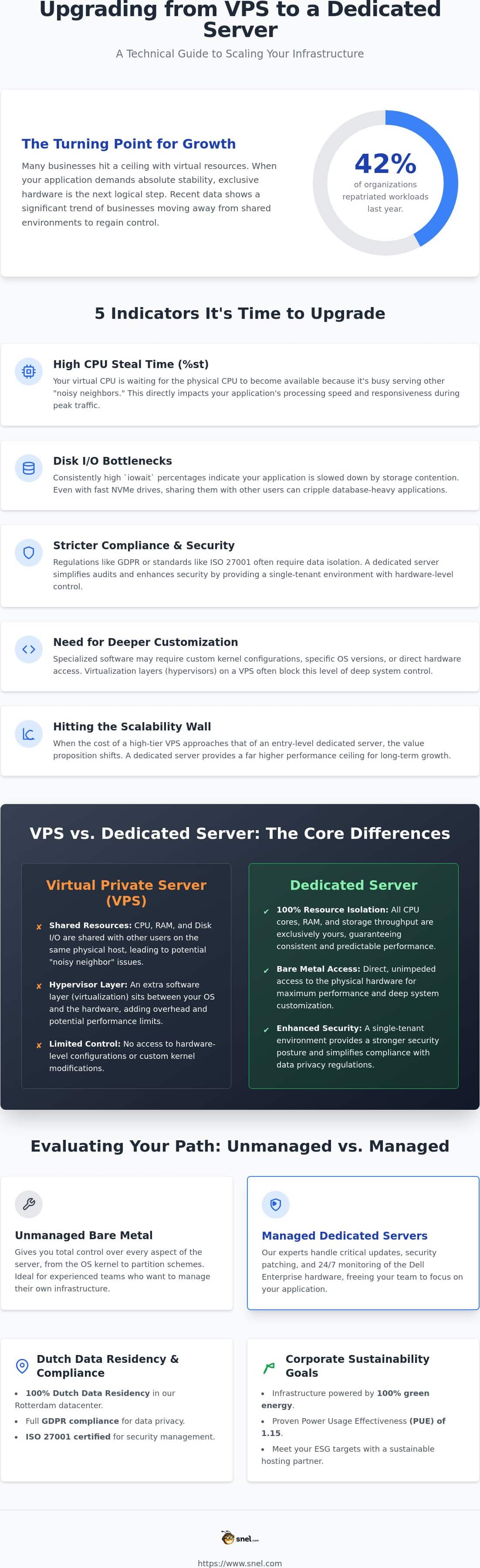
High CPU steal time is often the first red flag. When you run top or htop and see a high %st value, it means the physical processor is busy serving other virtual machines. You’re effectively losing processing power because of other users on the same host. If this happens during your peak traffic hours, it’s a clear signal to upgrade from VPS to dedicated server where the hardware belongs entirely to you. This shift ensures your computations execute immediately without waiting for a hypervisor to allocate cycles.
Disk I/O bottlenecks are another silent performance killer. Even on modern shared hosts with NVMe storage, high contention from neighboring accounts can slow down your database queries. If your iowait percentages are consistently creeping up, your storage is struggling to keep pace. Dedicated hardware eliminates this competition, providing direct, unhindered access to the drive’s full throughput. This is especially vital for data-heavy SaaS platforms or high-traffic e-commerce sites operating out of our Rotterdam datacenter.
Compliance and security requirements also drive the need for single-tenant hardware. For businesses handling sensitive data under ISO 27001 or GDPR, having exclusive use of the physical server simplifies audits and enhances data residency certainty. You also gain the freedom to implement custom kernel configurations or hardware-level access. This is essential for specialized software that requires direct interaction with the underlying server components, a level of control that virtualization layers typically block.
Monitoring the Performance Ceiling
To get a clear picture, look beyond simple CPU usage. Tools like htop help you visualize how your vCPUs are being throttled by external demands. Pay close attention to I/O wait times; if your application is sluggish despite low CPU usage, the shared storage layer is likely the culprit. Dedicated infrastructure removes these layers, ensuring your code executes without any external interference.
The Scalability Wall
There’s also a financial and technical turning point to consider. When the cost of a high-tier Pure Performance VPS begins to align with entry-level dedicated hardware, the value proposition shifts. Vertical scaling on a VPS has a hard ceiling. By choosing to upgrade from VPS to dedicated server, you gain a foundation that supports long-term business growth without the inherent limitations of a hypervisor. Recent data shows that 42% of organizations moved workloads back to dedicated environments last year to regain this specific level of performance and compliance control.
Evaluating Dedicated Hardware: Bare Metal vs Managed Infrastructure
Once you decide to upgrade from VPS to dedicated server, the next step is choosing how to manage your new environment. Unmanaged bare metal gives developers total control over every configuration, from the OS kernel to the specific partition schemes. However, many of our partners prefer managed dedicated servers to balance high performance with professional peace of mind. We utilize Dell Enterprise hardware rather than generic white-box components. This choice ensures reliability and longevity that consumer-grade parts simply cannot match.
The most significant shift is 100% resource isolation. On a VPS, you share the physical host’s RAM and CPU cycles with other users. On a dedicated machine, every clock cycle and every gigabyte of memory belongs exclusively to your application. This isolation extends to security. You gain hardware-level security features and the option for a dedicated firewall. This creates a fortified perimeter around your production data, which remains strictly within our Rotterdam datacenter for maximum privacy.
The Managed Advantage
For SMEs without a full-time IT department, managed infrastructure is a lifesaver. Our in-house experts handle critical kernel updates, security patching, and 24/7 monitoring. This allows your team to focus on building your product while we ensure the underlying hardware remains stable and secure. Before committing to a path, it’s worth understanding the full managed vs unmanaged VPS cost, including hidden expenses like security licensing and the staff hours spent on manual patches, to make the most informed decision. If you’re unsure which path fits your workflow, you can always speak with our support team for a personal consultation.
Performance Benchmarks
Raw compute power takes a significant leap when you move to dedicated resources. While a VPS might use shared AMD EPYC cores, a dedicated setup can leverage the latest Intel Xeon 6 or AMD EPYC “Turin” architectures found in 17th generation Dell PowerEdge servers. These systems support DDR5 memory and CXL 2.0 for enhanced memory expansion. Network throughput also improves. You move from shared virtual interfaces to dedicated uplinks ranging from 1 Gbps to 100 Gbps, ensuring your data moves as fast as the hardware allows. If your workloads currently run on a managed Windows VPS and you’re experiencing sluggish SQL Server performance or noisy neighbor issues, these benchmarks illustrate exactly why dedicated hardware represents such a significant upgrade.
The Migration Process: A Step-by-Step Transition Guide
Moving your infrastructure requires a steady hand and a clear plan. While some might claim migration is a one-click task, we know that protecting your data integrity requires a more methodical protocol. It starts with a deep audit of your current environment. You’ll need to document every cron job, specific library version, and firewall rule currently active on your VPS to ensure nothing is left behind during the move.
Before you move a single byte, execute a comprehensive backup. Using Acronis Cyber Protect gives you a reliable rollback point. It’s your safety net. Once your data is secure, you can provision your new dedicated server in our Rotterdam datacenter. When you plan to upgrade from VPS to dedicated server, mirroring your existing software environment on this new hardware is the best way to prevent service interruptions.
For the final sync, use rsync for your file systems and database replication for your active data. This keeps your new server updated in real-time while your old one is still live. Once the data is mirrored and verified, you can perform the final DNS cutover with confidence, knowing your production data hasn’t left the Netherlands.
Pre-Migration Checklist
Software compatibility is your first priority. Your old VPS might run an OS version that doesn’t leverage the full power of 17th generation Dell hardware. Verify these dependencies at least 48 hours before the move. You should also lower your DNS TTL values to 300 seconds. This ensures that when you update your records, the change propagates across the web in minutes rather than hours.
Data Transfer and Verification
You can choose a “lift and shift” approach or a clean installation. While a clean install takes more time, it’s often the better choice for long-term stability and removing legacy configuration bloat. When you upgrade from VPS to dedicated server, always test your application on a temporary IP address first. This allows you to verify that every database connection and SSL certificate is working perfectly before your customers ever see the new environment.
Beyond the Move: Maximizing Performance and Compliance
Completing the physical transition is just the beginning. Now that your data lives on exclusive hardware in our Rotterdam datacenter, you benefit from 100% Dutch data residency. This isn’t just a technical detail. It’s a cornerstone of GDPR compliance. Unlike global cloud giants that might shift your data across borders, we keep your production environment strictly within the Netherlands. This level of transparency is exactly why businesses choose to upgrade from VPS to dedicated server when they handle sensitive client information.
Efficiency goes beyond raw speed. Our datacenter operates with a Power Usage Effectiveness (PUE) of 1.15, powered by 100% green energy. Meeting corporate sustainability goals becomes much easier when your infrastructure is environmentally conscious by design. We also implement 24/7 expert monitoring to spot potential issues. Our team acts before a hardware hiccup can affect your users. As your needs grow, you can easily scale by adding private networks or additional storage nodes to your cluster.
Security and Certifications
Enterprise-grade security is baked into our environment. We maintain ISO 27001 certification to ensure your data is handled with the highest level of care. You can further harden your server by integrating ESET Protect or Imunify360. These tools provide proactive threat mitigation, stopping attacks at the perimeter before they reach your core applications. This hardware-level isolation combined with software-based protection creates a formidable defense for your SaaS or e-commerce platform.
The Snel.com Partnership
We believe in a personal approach to hosting. You’ll never have to fight through tiers of automated bots to reach a human expert. When you send a message, you get direct access to technical enthusiasts who know your setup. It’s the difference between being a number in a massive database and having a dedicated partner who cares about your success. We’re the neighborly experts who stay in the background so you can stay in the spotlight.
Take the Next Step Toward Enterprise Power
Transitioning to dedicated hardware is a strategic investment in your platform’s long-term stability. By moving away from shared virtual environments, you eliminate resource contention and gain the hardware-level control necessary for complex applications. Whether your priority is meeting strict GDPR requirements through our Rotterdam-based datacenter or reducing your carbon footprint with 100% Green Energy, the benefits of making the move are clear.
It’s the right time to upgrade from VPS to dedicated server when your growth demands predictable performance and enterprise-grade reliability. Our in-house experts are available 24/7 to ensure your transition is smooth and your hardware remains optimized. We pride ourselves on being a partner that values transparency and personal connection over automated support tickets. You’ve built something great; now give it the foundation it deserves to thrive in 2026 and beyond.
We’re ready to help you reach your next milestone with reliable, high-performance hardware that grows alongside your business.
Frequently Asked Questions
How long does it take to upgrade from VPS to a dedicated server?
Provisioning usually happens within a few business hours for our standard configurations in the Rotterdam datacenter. However, the total time to upgrade from VPS to dedicated server depends on your data volume and the complexity of your software dependencies. Most of our partners complete their full migration and DNS propagation within 24 to 48 hours to ensure every service is tested and stable.
Will there be downtime during the migration process?
You can achieve near-zero downtime by running your new dedicated hardware in parallel with your existing VPS. By syncing your files and databases in the background, you keep your site live on the old server while preparing the new one. The only brief interruption usually occurs during the final database sync, where you stop writes for a few minutes to ensure data consistency before the DNS cutover.
Can I keep my current IP address when moving to a dedicated server?
No, you’ll receive a new set of IP addresses because dedicated servers operate on different physical network segments than virtualized clusters. This change is actually a technical advantage for your email deliverability and SEO. You’ll have a clean slate on a dedicated IP that isn’t shared with any other users, protecting your reputation from the actions of “noisy neighbors” on a shared subnet.
Is a dedicated server more secure than a VPS for GDPR compliance?
Dedicated hardware provides a more robust compliance foundation because it offers total physical isolation for your production data. Since you aren’t sharing a CPU or RAM with other tenants, you eliminate the risk of cross-VM side-channel attacks. Our ISO 27001 certified environment in the Netherlands ensures that your data residency remains transparent and strictly within Dutch borders, which is a vital requirement for many GDPR audits.
Do I need to be a technical expert to manage a dedicated server?
You don’t need to be a systems administrator if you opt for our managed dedicated servers. While unmanaged bare metal gives you total control, our managed options include 24/7 assistance from our in-house experts. We handle the heavy lifting like security hardening and hardware monitoring. This allows you to enjoy the performance of exclusive hardware without the stress of managing the underlying infrastructure yourself.